Group Chats on Good Dog
Group chats on Good Dog give you and your buyers shared spaces to connect — a group for every litter, and a group for your whole program, all on Good Dog.

Now every litter you raise gets its own group chat on Good Dog, and every breeder gets a program group chat that brings all of their families together in one place. Post once and the whole group sees it — from photos before go-home to birthdays and milestones for years after. No one loves a puppy like the breeder who raised them and the family who welcomed them home, and now you're all in one place.
Two ways to stay connected
Litter group chats
- One group per litter
- For families getting puppies from the same litter, going through the same stages of puppyhood together
- A more casual, group-text feel
- A shared space to stay close from deposit through the dog's whole life
Program group chats
- One group for your whole program
- For all of your families across litters, past and future
- Threads keep conversations organized so it never becomes one endless scroll
- A lasting community for the life of your program
How It Works
Groups are created automatically: A litter group chat is created for each born litter on Good Dog. When you match a buyer to that litter or a specific pup, they're automatically added to the litter group. Your program group chat is created once, and new families join automatically once their placement is complete.
Share messages, photos, files, and reactions: You and your group members can send messages, photos, and files, and react with emojis in both litter and program groups.
Add non-Good Dog buyers and manage members: You can manually add buyers to your groups by email, which is helpful for any non-Good Dog buyers you've matched to a litter, or families you've placed dogs with outside of Good Dog. You can also remove group members anytime if needed.
Sharing Updates: Every Update you post is shared straight to your litter group chats, so buyers can follow along and share in the excitement together as their new pups get ready to come home.
Helpful prompts along the way: In both groups, you'll see automatic prompts designed to keep conversation flowing. In litter groups, these prompts are geared toward the stages of puppyhood, and in program groups, prompts are focused on connecting families across your program.
Frequently Asked Questions
Getting Started
Q: How do I access my group chats?
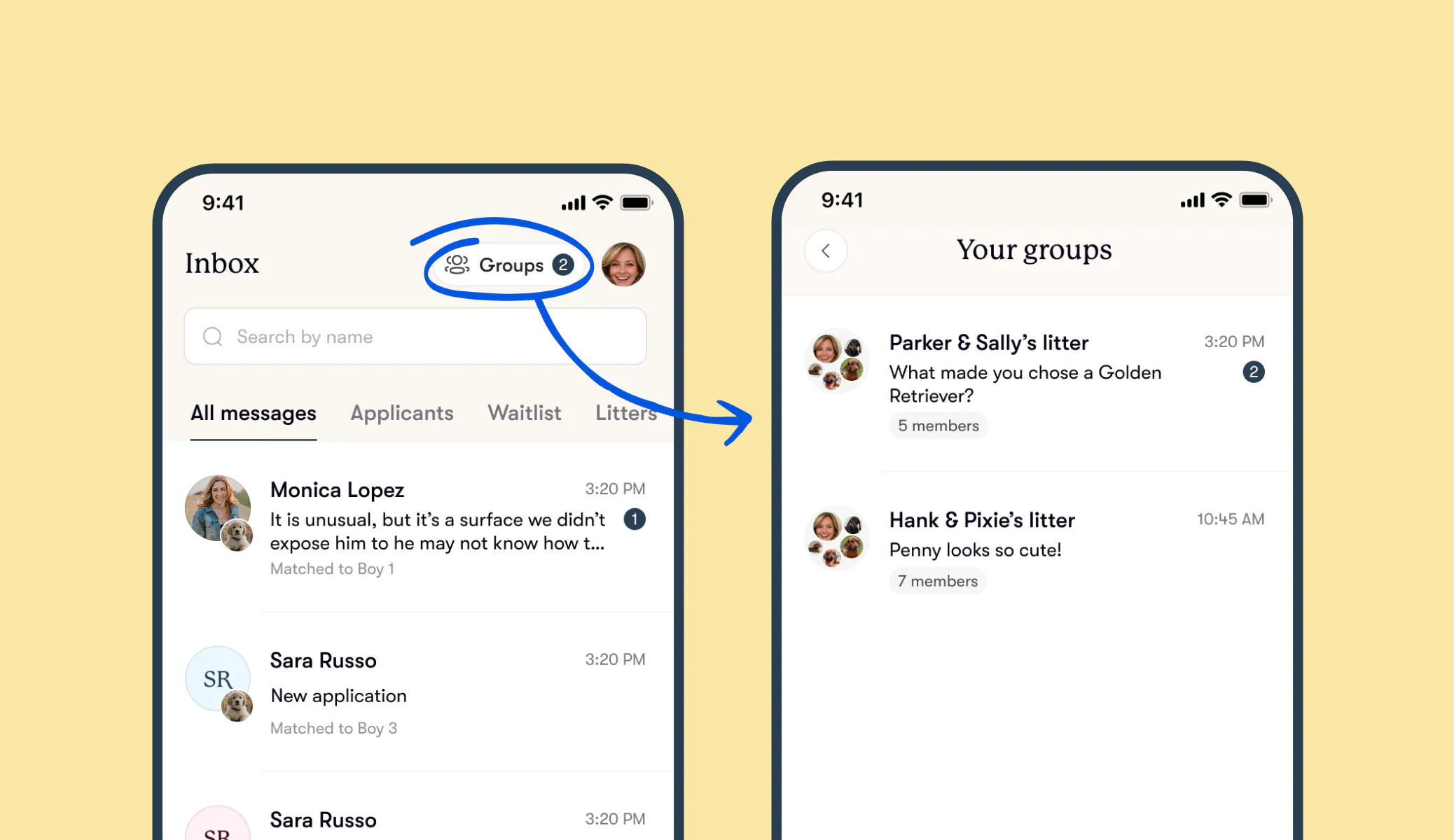
A: You can find your litter and program group chats in the upper right-hand corner of your Inbox — on the Good Dog app or on the web. Groups appear there automatically, so there's no setup required on your end.
Q: When is a litter group chat created?
A: A litter group chat is automatically created for each born litter on Good Dog. Buyers are added to the group as soon as they're matched to that litter or a specific pup, so the group grows naturally as your pups start finding homes.
Q: When is my program group chat created?
A: Your program group chat is created once and brings together all of your matched families across litters, past and future. New families join automatically once their placement is complete.
Q: What about litters that already went home?
A: You can open a litter group chat for those too — a nice way to reconnect with the families who took your puppies home. Just go to the litter, tap the menu in the top right, and choose "Create group chat." Families you've placed with in the past will also be part of your program group chat.
Q: Can I opt out of having group chats created automatically?
A: Yes. If group chats don’t feel like the right fit for your program, you can turn the feature off anytime in the Communications tab of your account settings. You can change this at any time.
Q: Do group chats expire?
A: We know your relationships with families often last long after pups go home, so we want this to be a trusted space for you to stay connected. Both litter group chats and program group chats stay open indefinitely, so you and your families can continue connecting as the dogs grow up and your program grows over time.
Managing Your Group
Q: Can buyers also share messages in the group?
A: Yes. Buyers can send messages, photos, and files, and react to messages with emojis in both litter and program group chats.
Q: Can I edit or delete a message that's been sent in the group?
A: Yes. Individual messages can be edited or removed from the group after they're sent, by either you or your buyers, in both group types. If something has been shared that you have concerns about, please reach out to your Good Dog Specialist and we can help.
Q: How do Updates work in the group?
A: When you post an Update, it'll be shared straight to your litter group chat automatically, so buyers can follow along and share in the excitement together as their new pups get ready to come home.
Q: How are conversations organized in program group chats?
A: Program group chats use threads, so a busy group never becomes one endless scroll. Families can start and follow specific conversations without losing track.
Adding and Removing Members
Q: Are non-Good Dog buyers or families automatically added to my groups?
A: Non-Good Dog buyers and families aren't automatically added, but you can invite them in by email anytime. For litter group chats, this is how you'd add any buyers you've matched with outside of Good Dog for that litter. For your program group chat, this is how you'd add families you've placed dogs with outside of Good Dog, so you can easily bring your whole community together in one place.
Q: Can I remove a buyer or family from a group?
A: Yes, you can remove any member from the group at any time, and they won't be notified when they're removed.
Q: What happens if a buyer doesn't end up working out?
A: If a buyer hasn't been added to the group yet, you don't need to worry. If they've already been added, you can manually remove them from the group at any time. If you ever need to block a buyer for any reason, they'll also automatically be removed from your litter and program group chats.
Q: Can a buyer add anyone else to the group?
A: No. Only you, as the breeder, can add members to the group. This helps keep the group limited to the people directly connected to your litter or program.
Q: Can buyers leave the group on their own?
A: Yes, buyers can remove themselves from a group anytime. You won't be notified if a buyer leaves on their own, but you'll always be able to see the full picture of all current group members.
Notifications and Support
Q: Can I mute notifications for a group?
A: Yes. You can mute notifications for any litter or program group chat while still remaining in it. You'll also continue receiving notifications from your individual message threads with buyers as usual.
Q: How do I report a concern about something in the group?
A: We want your group chats to always feel like a positive and safe space for you and your families. If you have a concern about a specific buyer, you can block or report them anytime from your direct message thread with them. Blocking will also automatically remove them from your litter and program group chats. For anything else that's come up, don't hesitate to reach out to your Good Dog Specialist. We're always here to take a closer look and support you.
We’re here to help!
Your Good Dog Specialist is always here to support you through every step of placing your pups in their forever homes. If you have any questions about your groups, or anything else along the way, please don't hesitate to email us anytime at breederteam@gooddog.com.