Contracts on Good Dog
Contracts on Good Dog make sharing and signing contracts simple. Simply send and sign contracts to buyers right from your Good Dog to-do list, and securely store all signed contracts in your dashboard.
Good Dog is on a mission to educate the public, support dog breeders, and promote canine health so we can give our dogs the world they deserve.
Good Dog is on a mission to educate the public, support dog breeders, and promote canine health so we can give our dogs the world they deserve.
Good Dog is on a mission to educate the public, support dog breeders, and promote canine health so we can give our dogs the world they deserve.
Contracts on Good Dog
Fits your process: Send and collect signatures when it makes sense for you. Contracts are no longer tied to payments, and you can turn them off anytime.
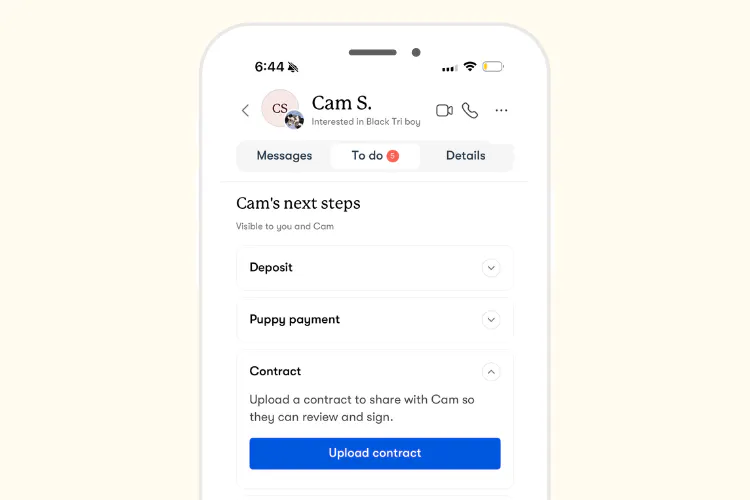
Built into your to-do list: Add and send a contract right alongside the rest of your placement steps, so buyers know to expect it.
Easy to sign, on any device: Click to add text and signatures, then send from your phone or computer. Buyers complete their details and sign the same way. No printing or scanning.
Legally binding, with no additional fees: Every signature collected through Good Dog is binding, and our team is here if you need help.
How It Works
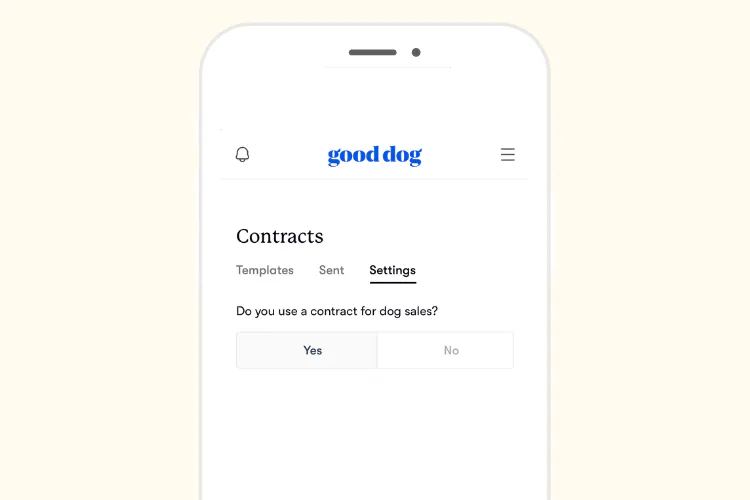
- Control your process: Contracts now automatically appear in each buyer's to-do list. If you don't use contracts, you can turn this off anytime in your profile settings.
- Send when you're ready: Choose a contract from your to-do list in the messenger, fill in the details, sign, and send it to your buyer to complete.
- Sign with confidence: Sign easily from your phone or computer. All signatures are legally binding, just like pen and paper.
- See contract status and stay organized: Your dashboard shows each contract's status (sent, waiting for signatures, or fully signed) and keeps all your signed contracts in one place.
Prefer pen and paper? Upload a photo or file of a signed contract to keep everything organized in your dashboard.
Frequently Asked Questions
- Getting Started
- Creating and Customizing Contracts
- Sending Contracts
- Signing and Editing
- Storage and Access
- To-Do List
Getting Started
Q: How do I get started with contracts on Good Dog?
A: There’s no setup required! You can start sending contracts right from your to-do list in the messenger. Just choose a contract you've used before or upload a new one, fill in the details for your buyer and puppy, sign, and send. Both you and your buyer can review and sign from any device, including your phone or computer, and you'll receive a notification when your buyer has signed.
You can track the status of any contract in the Contracts section of your profile Settings to see if it's been sent, is waiting for signatures, or is fully signed. You can also access signed copies of your contracts anytime.
The first time you use electronic signatures on Good Dog, you'll be prompted to sign a signature consent form. After that, you're all set!
Q: What if I don't use contracts?
A: Contracts now automatically appear in each buyer's to-do list. If your program doesn't use contracts, you can turn this off anytime by going to the Contracts section of your profile Settings and switching the toggle to "No." This will remove the contract step from both your to-do list and your buyers' to-do lists.
That said, we know contracts can be an essential part of protecting your program and your pups. Contracts help protect both you and your buyers by clearly outlining responsibilities, health guarantees, and expectations. If you need help getting started, check out Good Dog's sample contract templates to make the process easier!
Q: What is a contract template?
A: A contract template is a reusable version of your contract that you upload once and can use with all your buyers. This is a copy with blank spaces for details like puppy name, buyer information, etc. Each time you send a contract, you'll fill in those details for that specific placement—but you don't need to upload a new template every time.
You only need one template per contract type. For example, if you use the same contract for all your puppy sales, you just need one template. You don't need to upload a separate template for each buyer or placement.
Q: Where and how do I upload my contract template?
A: To upload your contract template, go to the Contracts section of your profile Settings and select "Upload template." You can upload multiple templates if needed—for example, if you have different contracts for different breeds. Once uploaded, your templates will be saved and ready to use whenever you need them.
Q: What file types can I upload for my contract?
A: You can upload your contract in any of these common file formats: .doc, .docx, .pdf, .jpeg, .png, and .txt.
Q: I previously uploaded contract templates to Good Dog. Does this mean I will need to upload them again?
A: Your existing contract templates have been automatically moved to our new system and are ready to use. Just select one from your to-do list and send it to your buyer—no need to re-upload!
Visit the Contracts section of your profile Settings to view all of your existing contract templates and upload new ones.
Q: Is it ok to continue using paper contracts with Good Dog buyers?
A: Yes! If you sign a contract outside of Good Dog, you can still upload the completed, signed contract to keep your records organized in your dashboard.
That said, many breeders find contracts on Good Dog much easier to manage. You can send a contract to your buyer in just a few clicks, and both of you can fill in details and sign from any device—like your phone at pickup or from your computer at home. Contracts are easier to track (you can check your dashboard to see if they've been sent, are waiting for signatures, or are fully signed), ensure nothing gets lost, and give both you and your buyers quick access to signed contracts whenever you need them. Plus, they appear in both your and your buyer's to-do lists, so everyone knows it's a step to complete before your pup’s go-home day.
Q: Why should I use contracts with my buyers?
A: Contracts can be an essential part of protecting your program, your pups and your buyers by clearly outlining expectations, responsibilities, health guarantees, rehoming policies, and other important aspects of a puppy placement. A well-written contract creates clarity, builds trust, and provides protection for everyone involved.
We recommend using a contract for every puppy placement, and Good Dog makes it easy to get started with sample contract templates, and manage and store them all in one secure place.
And using contracts on Good Dog is simple: You can send a contract in just a few clicks, and both you and your buyer can fill in details and sign from any device—like your phone at pickup or from your computer at home. Contracts appear in both your and your buyer's to-do lists, so everyone knows it's a step to complete to bring their pup home. Plus, you can always see if your contract has been sent, is waiting for signatures, or is fully signed right from your dashboard.
Creating and Customizing Contracts
Q: Can I edit my contract template after uploading it?
A: You can't edit the template itself directly on Good Dog after uploading it. If you need to make changes to your template, simply edit it in Word, Google Docs, or another program, and then upload the updated version.
If you've already sent a contract to a buyer and need to make changes, you'll need to cancel the existing contract in the message thread and resend it with your updates. This option is only available if the buyer has not yet signed.
When you send contracts to individual buyers, you'll still be able to fill in custom fields with their specific details for each placement.
Q: Do I customize my contract before uploading it, or when I’m sending it to individual buyers?
A: You'll create your contract template with blank spaces for details like puppy name, sire/dam names, and signatures. Then when you send it to a buyer, you'll fill in those blanks with the specific information for that placement.
Q: Can I create a new contract from scratch, or does it have to be from a template?
A: You'll need to upload a contract template to use contracts on Good Dog. If you want to build a contract from scratch, you can create it in Word, Google Docs, or any other program, and then upload the final template to Good Dog.
Q: Does Good Dog offer any contract templates to help me get started?
A: Yes! We have sample dog contracts available in our Legal Resource Center. These templates are designed to be a jumping-off point that you can customize to fit your program's specific needs.
We offer a variety of templates for you to review, including non-refundable puppy deposit agreements, limited registration puppy sale contracts, and more.
Sending Contracts
Q: When can I send my contract?
A: Anytime you'd like! The timing is completely up to you and what works best for your process.
Q: Do I have to send a contract with every payment request?
A: No—contracts no longer need to be sent with a payment request. You can send a contract anytime that works for your process. Contracts appear in your buyer's to-do list alongside other steps like deposit and final payment, so buyers know to expect a contract from you. You just send it when you're ready.
Q: Is there a limit on how many contracts I can send one buyer?
A: You can send one contract to each buyer through your Good Dog to-do list. You can always send additional contracts to a buyer if needed, but they won't appear on your Good Dog to-do list or your buyer's to-do list.
Q: Where can I see which of my contracts are sent, pending, or signed?
A: You can track all of your contracts by going to the Contracts section of your profile Settings. From there, you'll see which contracts have been sent, are pending signature, or have been signed. You can also download and print signed contracts if you’d prefer to have paper copies for your records.
Q: How will buyers receive my contract?
A: Buyers will receive an email alert and a notification in their Good Dog messenger letting them know a contract is ready to sign. The contract will also appear on their to-do list, so they can easily find it and sign it.
Signing and Editing
Q: What are electronic signatures?
A: Electronic signatures are how contracts on Good Dog are signed. They're digital signatures that you can use any device, like a phone or computer, to sign. Electronic signatures are digital signatures that are just as legally binding and secure as traditional pen-and-paper signatures. They make it easy to sign contracts online without needing to print, scan, or mail documents.
Q: How do I and the buyer sign the contract?
A: Signing is simple! When you set up your contract template, you can add places for signatures wherever you need them. When it's time to sign, both you and your buyer will see exactly where to sign—just click to add your signature.
The first time you use electronic signatures on Good Dog, you'll be prompted to sign a signature consent form to get started.
Q: Can contracts be signed through the Good Breeder mobile app?
A: Yes! Contracts can now be signed through the Good Breeder mobile app (available for iOS and Android), as well as on desktop. This makes it easy to review and sign contracts from anywhere.
Q: What if I need to make changes after sending a contract to a buyer?
A: If you've already sent a contract to a buyer and need to make changes, you'll need to cancel the existing contract in the message thread and resend it with your updates. Please note this option is only available if the buyer has not yet signed.
Make the necessary changes to your contract in Word, Google Docs, or another program, and then re-upload the updated version to share with your buyer.
Storage and Access
Q: Where are my signed contracts stored, and how do I access them later?
A: All of your signed contracts are stored in the Contracts section of your profile Settings. You can access them anytime you need to review or download a copy for your records.
Q: How long are my signed contracts stored on Good Dog?
A: Your signed contracts are stored permanently on Good Dog, so you can access them anytime you need them. They'll always be available in your Contracts section for your records.
Q: How can I print my contracts?
A: You can download and print fully signed contracts by going to the Contracts section of your profile Settings.
Q: Can buyers access their signed contracts after signing?
A: Yes! Buyers can always access their signed contracts through their to-do list in their Good Dog messenger. This gives them a secure place to review or download their contract whenever they need it.
Q: What is the certificate page attached to my signed contract?
A: Once a contract is fully signed by both you and your buyer, Good Dog automatically attaches a certificate page to the end of the document. This certificate includes details like the date the contract was signed and who signed it. It serves as an official record of the signature process and adds an extra layer of security and verification to your signed contracts.
To-Do List
Q: Will contracts automatically appear as a step on my to-do list and the buyer's to-do list?
A: Yes! Contracts will automatically appear as a step on both your to-do list and your buyer's to-do list as long as you've indicated in your profile settings that your program uses contracts.
Q: Can I control whether contracts show as a required step in the to-do list?
A: Your profile is automatically set to indicate that you use contracts, which means they'll appear as a step in your to-do list, and your buyer’s. If your program doesn’t use contracts, you'll need to go to the Settings tab of your Contracts section and switch the toggle setting indicating you offer contracts to "No." This will remove the contract step from both your to-do list and your buyers' to-do lists.
Additional Support
Your Good Dog Specialist is always here to support you. Please don't hesitate to email us anytime at breederteam@gooddog.com.
Join our Good Breeder community
Are you a responsible breeder? We'd love to recognize you. Connect directly with informed buyers, get access to free benefits, and more.